

Project #89 · Member project
Berry Radio SDR Remote Monitor Station Project
ZS6RVC & ZR6AIC · December 2024
Category
Receivers
Version
—
Status
—
Difficulty
—
Built by members
0
About this build
https://www.giga.co.za/ocart/index.php?route=product/product&product_id=910
http://zr6aic.giga.co.za:8073/
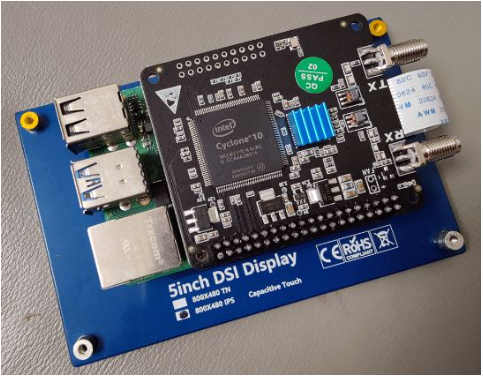
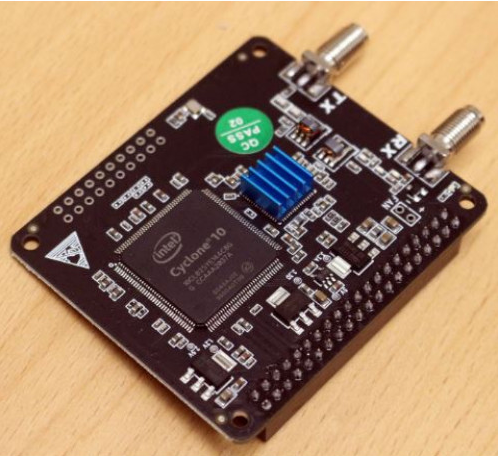
Setting up your Radioberry SDR transceiver for WebSDR access is a rewarding project that combines Raspberry Pi, SDR hardware, and web-based radio streaming. Here's a step-by-step guide to get you started, with helpful videos woven in to make the process smoother:
🛠️ Hardware & Software Requirements
- Raspberry Pi 4 or 5
- Radioberry Pi Hat (HF SDR transceiver)
- SD card (32GB or more)
- OpenWebRX+ software
- Internet connection
- Optional: SDRPlay or RTL-SDR dongle for additional RX
🚀 Step-by-Step Setup Guide
1. Install Radioberry on Raspberry Pi
- The Beginners Guide To The Radioberry HF SDR Transceiver … walks you through installing the Radioberry service on a Raspberry Pi 4, including initial configuration and software setup.
2. Connect and Configure the Radioberry Pi Hat
- RADIOBERRY – HF SDR TRANSCEIVER PI HAT explains how to physically install the Pi Hat and configure it using SDR Console.
- RADIOBERRY HF SDR TRANSCEIVER PI HAT – IT'S BACK! gives a great overview of the hardware and its capabilities.
3. Install OpenWebRX+ for WebSDR Access
- OpenWebRX Simplest Rasprberry Pi + RTLSDR Web SDR … shows how to flash a pre-configured OpenWebRX+ image to your SD card and set up the Raspberry Pi as a web-accessible SDR server.
- You’ll need to:
- Download the OpenWebRX+ image
- Use Raspberry Pi Imager to flash it
- Enable SSH and set up Wi-Fi/local network
- Connect your Radioberry or SDR dongle
- Boot and configure profiles in OpenWebRX+
4. Explore the SDRBerry Interface
- SDRBERRY – This User Interface Is Just GORGEOUS! AND IT … showcases the SDRBerry UI, including how to use the optional web interface and install SOAPY drivers for different SDR types.
5. Fine-Tune and Test
- Raspberry Pi HF radio – step by step instructions provides a full walkthrough from hardware setup to software configuration and testing your HF radio capabilities.
🌐 WebSDR Configuration Tips
- Use the websdr.cfg file to set:
- Start frequency
- Sample rate (e.g., 2048000)
- SDR input port
- IP address for WebSDR access
- You can access the SDR from any browser on your local network, or configure port forwarding for remote access.
🧠 Bonus Insights
- Want to sync your transceiver with a WebSDR? Tools like CATSync can help you mirror frequencies between your rig and the WebSDR interface.
- OpenWebRX+ supports decoding digital modes like SSTV, APRS, and NOAA weather directly in the browser.
If you’d like help with a specific part—like decoding digital signals or setting up remote access—I’m happy to dive deeper. Want to make your SDR setup look as cool as it sounds? I can help with that too.